One of my favorite features of Synthesis, the development host I use, is that it includes WP-CLI out of the box. Many hosts offer this now, and having WP-CLI available on your server speeds up common tasks. One particularly useful command I use regularly is the image regeneration tool.
When building a client site you’ll often add a new image size for a specific area. After registering that size you need the existing images to include the new size so the theme can serve the correct dimensions. Regenerating all thumbnails is simple with WP-CLI: wp media regenerate.
On sites with a large media library, regenerating every image can take a long time. Often only a few attachments need the new size. WP-CLI lets you target specific attachments by listing one or more attachment IDs after the command. That way you regenerate only the images you need and save time.
Most WordPress installations add a class to image tags in the format “wp-image-xxxx”, where xxxx is the attachment ID. You can find the ID by inspecting the image’s HTML in the browser. For example:
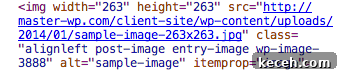
If your theme (for example, Genesis 2.0) replaces or omits that class, you can add it back with a small filter. The following code ensures the attachment ID class is present on images:
| /** | |
| * Attachment ID on Images | |
| * @author Bill Erickson | |
| function be_attachment_id_on_images( $attr, $attachment ) { | |
| if( !strpos( $attr[‘class’], ‘wp-image-‘ . $attachment->ID ) ) | |
| $attr[‘class’] .= ‘ wp-image-‘ . $attachment->ID; | |
| return $attr; | |
| } | |
| add_filter( ‘wp_get_attachment_image_attributes’, ‘be_attachment_id_on_images’, 10, 2 ); |
general.php
hosted with ❤ by GitHub
To regenerate a specific image after adding a new size, run the command with the attachment ID. For example:
wp media regenerate 3888
Quick and efficient — regenerate only what you need and keep development moving.